Job
Every action performed in Workspaces generates a Job. These allow you to analyze the outcome of the executions performed; for example, by checking the output of a microservice execution. Jobs collects all the jobs performed in the organization, which also provides historical execution records, allowing it to be used as an audit log.
List view
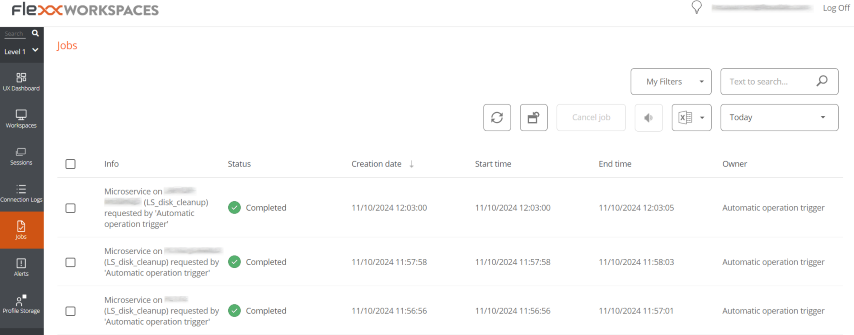 The jobs view consists of the following elements:
- Options at the top of the interface
- Job list view
Top options
-
Refresh the job list and show updated values.
-
Resets all settings made for the jobs view.
-
Filter jobs by age:
- Today (default filter)
- This week
- This month
- This quarter
- This year
-
Cancelallows you to cancel pending jobs. -
Notifyallows you to subscribe to a specific job to receive an email notification when it's completed. -
Export toallows you to export in the selected type. -
My filtersallows you to accessPredefined filtersor user-created ones. -
Jobs can be filtered by any parameter in the list in the
Searchbox.
Jobs list
The job list, like all list views in Workspaces, allows multiple filtering and customization options as defined in Filtering Options in Listings.
Detail view
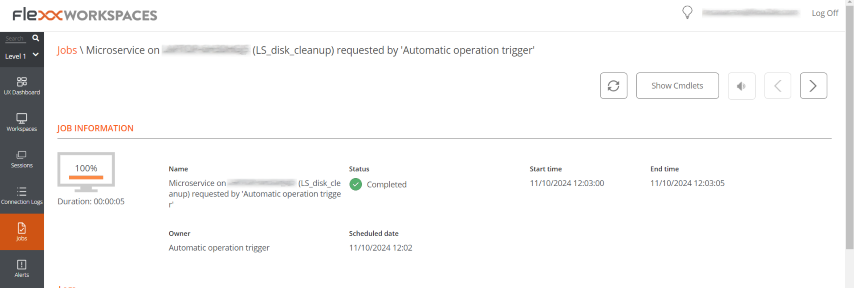 The detail view includes a progress bar indicating the percentage of the job that has already been executed.
Statuses
- Pending. The task is pending to start.
- In progress. The task has started and is still ongoing.
- Completed. The task is finished.
- Error. The task has not finished correctly or has ended with errors.
- Cancelled by user. When a user cancels the task.
- Completed with errors. When the task is completed, but at least one step failed with non-critical errors.
If a job takes too long in the In progress status without logging any information, its status will automatically change to Error. However, this does not mean that the job will not be completed successfully, but that the timeout was exceeded due to an activity block during task execution.
Available information
In all cases, jobs include the following information:
- Change to be made (INFO)
- State
- Created date
- Start Date
- End Date
- User who made the change (OWNER)
At the bottom of the screen, depending on the type of job, the following tabs may appear:
Logs
The logs tab allows consulting the data of each step in the execution; for example, when a microservice is executed on a device and you want to check the script execution output. This information is saved in the corresponding step (log line in list).
To improve the visibility of script outputs, it is recommended, in the case of PowerShell scripts, to use the
Write-Outputcommand instead ofWrite-Host.
Workspaces
The Workspaces tab allows you to easily see the information of the devices that executed the job, in case of multiple executions.
Job subscription
This feature allows subscribing to specific jobs, that have not yet started or are in progress. The system will notify by email when they are completed.
To subscribe, select the jobs from the list and activate the Send notification button.